Trend analysis
Packages
import ee
import geemap
import pandas as pd
import numpy as np
import geopy_ee_ts_fun as geopy

try:
    ee.Initialize(project="ee-pflugmacher")
except Exception as e:
    ee.Authenticate()
    ee.Initialize(project="ee-pflugmacher")
Set up map window
In this exercise, we are going to map trends. First, we define a region, a coordinate reference system crs, and a scale(pixel size) or affine transformation crsTransform.
region = ee.Geometry.Polygon(
        [[[12.901495385988614, 53.14672196059798],
          [12.901495385988614, 52.850010520689125],
          [13.426092553957364, 52.850010520689125],
          [13.426092553957364, 53.14672196059798]]])
scale = 20
crs = 'EPSG:3035'Map = geemap.Map()
Map.centerObject(region, zoom=11)
MapVisualization parameters
# Sentinel-2 surface reflectance
s2Vis = {"bands": ["B4", "B3", "B2"], "min":0, "max": 1200}

# NDVI color palette
ndviVis = {"palette": ['white', 'green'], "min":0.2, "max": 1}Sentinel-2 data
The code block below filters the Sentinel-2 collection, masks clouds and calculats NDVI. The cloud masking approach uses the AI-based Cloud Score+ available in the Cloud Score+ Harmonized-S2 dataset. The Sentinel-2 harmonized dataset fixes different scaling factors in the original Sentinel-2 dataset.
dateFilter = ee.Filter.And(ee.Filter.dayOfYear(200, 365),
                           ee.Filter.date(ee.Date.fromYMD(2018, 1, 1),
                                          ee.Date.fromYMD(2021, 12, 31)))

# Harmonized Sentinel-2 Level 2A collection.
s2 = ee.ImageCollection('COPERNICUS/S2_SR_HARMONIZED')

# Cloud Score+ image collection. Note Cloud Score+ is produced from Sentinel-2
# Level 1C data and can be applied to either L1C or L2A collections.
csPlus = ee.ImageCollection('GOOGLE/CLOUD_SCORE_PLUS/V1/S2_HARMONIZED')

# Use 'cs' or 'cs_cdf', depending on your use case; see docs for guidance.
QA_BAND = 'cs_cdf'

# The threshold for masking; values between 0.50 and 0.65 generally work well.
# Higher values will remove thin clouds, haze & cirrus shadows.
CLEAR_THRESHOLD = 0.60

def mask_s2(image):
    return image.updateMask(image.select(QA_BAND).gte(CLEAR_THRESHOLD))

s2m = s2.filterBounds(region) \
        .filter(dateFilter) \
        .linkCollection(csPlus, [QA_BAND]) \
        .map(mask_s2)

# Create NDVI Collection from masked Sentinel-2 data
ndviS2 = s2m.map(geopy.calcNdviS2)ndviS2Harmonic function
In this exercise, I fit a first-order harmonic model of the form:
The harmonic model is fitted to every pixel, i.e., we will estimate the parameters , , , and for every pixel. The ´s are parameters for and different transformations of , where is time in days or (fractional) years and is the period. The period describes how many it takes to complete a full harmonic cylce. For example, is 1 if is in years and 365 if is in days. The model estimates , which is the NDVI in our case.
The first step is to assemble the response (NDVI) and predictor variables. The function addPredictorVariables() adds four bands to an NDVI image. The four bands are the intercept and the predictors, i.e., and its harmonic tranformations. The band constant has the pixel value 1 and is required to fit an intercept. The band time, associated with parameter , is time expressed in years since January 1st 1970. It is a fractional value with decimal places. Now, the predictor variables do not vary for a specific NDVI image, i.e., is constant for a specific image. However, recall that we fit time series to individual pixels. You also see that we can create an image with a scalar value simply by calling ee.Image(scalar). Earth engine will expand the scalar value in space as needed, i.e., defined by the output region.
def addPredictorVariables(image):

    date = ee.Date(image.get('system:time_start'))
    time = date.difference(ee.Date('1970-01-01'), 'year')
    sin = time.multiply(2 * np.pi ).sin()
    cos = time.multiply(2 * np.pi ).cos()

    predictors = ee.Image([sin, cos, time, 1]).float()

    return predictors.addBands(image.select(['ndvi'])) \
                     .rename(['sin', 'cos', 'time', 'constant', 'ndvi']) \
                     .set('system:time_start', image.get('system:time_start'))

trainingCollection = ndviS2.map(addPredictorVariables)Fit model
Now, we can estimate the ´s using linear regression. The reducer is not aware of variable names and their order in the image. It assumes the last variable to be the response variable. So, we make sure that NDVI (responseName) is selected last.
The output of the regression reduction (trend) contains two bands: coefficients and residuals. However, trend is an array image and not a standard image. An array image can store an entire vector/array in each pixel not just a scalar value. For example, an array image can store a six-band image in a single band, where each pixel would contain a vector of length six. However, pixels in an array image do not have to store vectors of the same length. In our case, the coefficients band stores the coefficients in a 4x1 array in each pixel. To turn this into a four band image, we need to apply arrayProject (removes the second axis of length 1) and arrayFlatten (puts every array element into its own band).
responseName = ee.String('ndvi')
predictorNames = ee.List(['constant', 'time', 'cos', 'sin'])

trend = trainingCollection.select(predictorNames.add(responseName)) \
            .reduce(ee.Reducer.linearRegression(predictorNames.length(), 1))

coefficients = trend.select('coefficients') \
                    .arrayProject([0]) \
.arrayFlatten([predictorNames])Visualizing the coefficients reveals different patterns in seasonality and trend (time) for different land cover types. The harmonic model compresse the NDVI time series into a few parameters that still represent the spectral-temporal dynamics. NOTE: the visualization of the map can take a while. The pixelwise trend fitting is processing intenstive. Keep the zoom level steady. The process restarts every time you zoom in or out.
Map.addLayer(coefficients.select(['sin']), {"min": -0.23, "max":0.1}, 'sin')
Map.addLayer(coefficients.select(['cos']), {"min": -0.23, "max":0.1}, 'cos')
Map.addLayer(coefficients.select(['time']), {"min": -0.03, "max":0.03, "palette": ['red', 'white', 'green']}, 'time')Fitted values
We can obtain the fitted NDVI values to better understand how our models fits the data. To do this, we need to write a funciton that takes a training image (containg NDVI, and the harmonic terms) and applies the estimated coefficients. We then map that function to the training collection to obtain a collection of fitted NDVI images.
def linearFit(image):
    fit = image.select(predictorNames) \
               .multiply(coefficients) \
               .reduce('sum') \
               .rename('fitted')
    return image.addBands(fit)

fitted = trainingCollection.map(linearFit)Pixel observations
Let’s evaluate the model fit for individual pixel observations. To visualize these pixels, we first extract the NDVI time series for a single pixel. Second, we extract the coefficients. And third, we extract the fitted values.
Extract NDVI time series
pt_dbf = ee.Geometry.Point([13.18496707443565,53.06189771226909])
pt_ag1 = ee.Geometry.Point([13.134970698398053, 53.06835763719942])
pt_ag2 = ee.Geometry.Point([13.047938380282819, 53.04421500010952])
pt_ag3 = ee.Geometry.Point([13.0798673963961, 53.010351264908145])ee_vals = ndviS2.getRegion(geometry=pt_dbf, scale=scale, crs=crs)
# use data converter to return values as python list
vals = ee.data.computeValue(ee_vals)
vals[0:3]
[['id', 'longitude', 'latitude', 'time', 'ndvi'],
 ['20180721T102021_20180721T102024_T32UQD',
  13.184850310654017,
  53.06195679914768,
  1532168424461,
  0.8832853025936599],
 ['20180721T102021_20180721T102024_T33UUU',
  13.184850310654017,
  53.06195679914768,
  1532168424461,
  0.8791130185979972]]
# convert returned list to pandas data.frame
# the first element (vals[0]) contains the column names
# the second element contains the first observation and so on
df = pd.DataFrame(vals[1:], columns=vals[0]).dropna()
# extract date string and convert it to date object
df['date'] = pd.to_datetime(df.id.str.slice(0, 8))
# copy date to row index
df.index = df.date
df.head()
The dataset may contain duplicate values due to the overlapping Sentinel-2 tiles. That is, there should only be one observation for a given day. So, let’s drop duplicate values.
df = df.drop_duplicates(subset=['date'])
df.head()Now we can plot column ndvi against the dataframe index, which is date.
df.ndvi.plot(style='.', figsize=(5,3));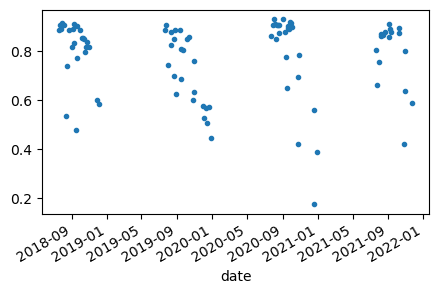
Extract coefficients
We can extract the coefficients of the harmonic model for a single pixel using a reducer. Coefficients is an ee.Image, which has the sampleRegions reducer. You may get an exception “User memory limit exceeded”. To avoid this error, you can limit the processed area size or save intermediate results to your assets.
# returns feature collection
ee_coef = coefficients.sampleRegions(collection=pt_dbf, scale=scale,
                                     projection=crs)

# extracts feature collection (server-side) to pandas dataFrame (client-side)
pt_coef = ee.data.computeFeatures({'expression': ee_coef, 'fileFormat': 'PANDAS_DATAFRAME'})
pt_coef.drop(columns="geo", inplace=True)
pt_coefExtract fitted values
Let’s extract the fitted NDVI values for a single pixel. Note, fitted is an ee.ImageCollection, which we can reduce with getRegion(). The output is a list that we can turn into a Pandas DataFrame for further analysis.
ee_fit = fitted.getRegion(geometry=pt_dbf, scale=scale, crs=crs)
pt_fit = ee.data.computeValue(ee_fit)

dfit = pd.DataFrame(pt_fit[1:], columns=pt_fit[0]).dropna() # create DataFrame and drop NA
dfit["date"] = pd.to_datetime(dfit.id.str.slice(0, 8)) # extract date from tile-id
dfit.index = dfit.date # put date into index to facilitate plotting
dfit = dfit.drop_duplicates(subset=['date']) # EE fits to duplicate values
dfit = dfit.iloc[:, np.delete(np.arange(dfit.shape[1]), 4)] # drop first 'time' column
dfit.iloc[:,4:].head(3)Visualize extracted values
dfit[["ndvi", "fitted"]].plot(style=['.', 'x'], figsize=(6,4));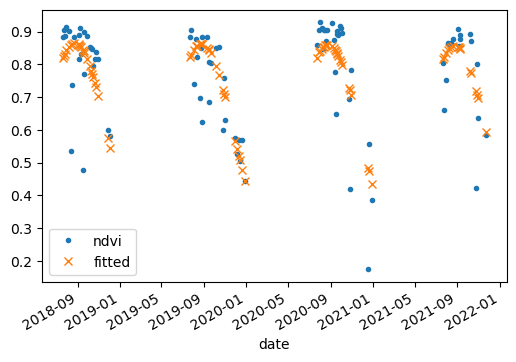
Make predictions
def fit_harmonic(t, constant, time, sin, cos, period=1):

    result = constant + time*t + \
                sin*np.sin(2.0 * np.pi * (t / period)) + \
                cos*np.cos(2.0 * np.pi * (t / period))
    return result

def fit_trend(t, constant, time, sin, cos ):
    result = constant + time*t
    return result
# date difference in days
t = pd.date_range('2018-01-01', '2021-12-31', freq='D')

# date difference in yeas
td = (t - pd.to_datetime('1970-01-01')) / np.timedelta64(1, 'D') / 365.25

# convert params stored in data frame to dictionary
params = pt_coef.to_dict(orient='records')[0]

# the result is a pandas.core.indexes.numeric.Float64Index
# we can extract the values of t with t.values
fitted_harm = fit_harmonic(td.values, **params)

fitted_trend = fit_trend(td.values, **params)

dfm = pd.DataFrame({'ndvi_harm':fitted_harm,
'ndvi_trend': fitted_trend}, index=t)ax = dfit[["ndvi", "fitted"]].plot(style=['.', 'x'], figsize=(6,4))
dfm.plot(ax=ax);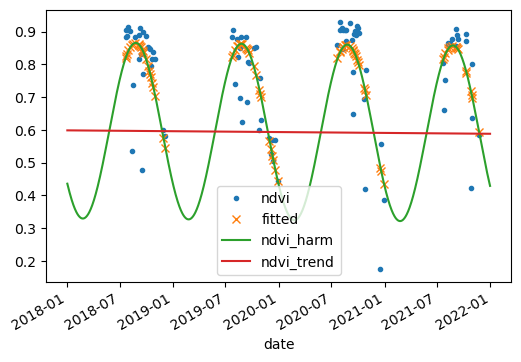
Sen’s slope
https://